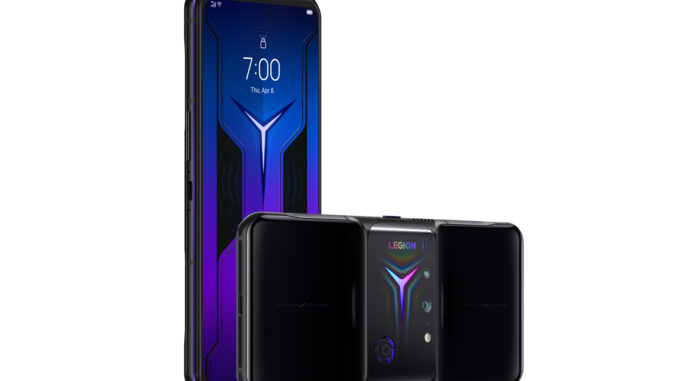
Lenovo Legion Phone — A Complete Buyer’s Guide
If you’re shopping for a truly gaming-focused smartphone, the Lenovo Legion series deserves a close look. Launched as a challenger to ROG Phone, Black Shark, and other gaming lines, Legion phones lean hard into raw performance, thermal engineering, and gamer-first features (thumb-friendly ergonomics, shoulder triggers, RGB accents). But they’re also full phones — with good displays, capable cameras, and long batteries — so it pays to know what you’re buying.
This guide walks you through what makes a Legion phone special, the trade-offs, what to check before buying, and whether one is right for you.
What is the Legion phone line? (Quick primer)
Legion is Lenovo’s gaming smartphone sub-brand (sometimes overlapping with Motorola in various regions). The phones are designed primarily for gamers and power users: high-refresh displays, flagship or near-flagship chipsets, aggressive cooling systems, advanced haptics, and software tuned for sustained performance. Over the generations, Legion devices moved from niche curiosities to polished, stable performers that also work as everyday drivers.
Why buy a Legion phone? Key strengths
-
Performance-first hardware
Legion phones frequently use top-end SoCs (Snapdragon flagship chips, sometimes tuned variants), lots of RAM (12–24 GB on some models), and very fast storage. You get ultra-low latency and consistently high frame rates in demanding games. -
Thermal engineering
One of the biggest differences versus regular phones is cooling: vapor chambers, oversized graphite sheets, active cooling in some models, and clever heat sinks. That means less throttling and better long gaming sessions. -
Gaming ergonomics & controls
Expect shoulder triggers (touch or physical), optimized game launchers, and layouts that keep your hands off the camera bump. Some Legion models put the main camera in the center or use side-mounted lenses to avoid covering them during landscape gaming. -
Display quality for gaming
High refresh rates (120–165Hz and sometimes higher), low touch latency, and fast sample rates for accurate touch control. Colors and brightness are close to flagship levels, often with HDR support. -
Battery & charging
Large battery capacity and very fast wired charging (some Legion phones support 90W–120W tech). The combination means shorter breaks between marathon sessions. -
Audio & accessories
Stereo front-firing speakers, advanced haptics for immersion, and a range of accessories — controllers, cooling docks, and docks that turn the phone into a desktop console or streaming station.
Trade-offs to be aware of
-
Size & weight: Gaming phones tend to be chunky and heavy because of batteries and cooling hardware. If you prefer a light pocketable phone, Legion may feel bulky.
-
Camera performance: While the main sensors are competent, Legion phones usually prioritize performance and cooling over spectacular camera systems. If photography is your main priority, consider a camera-centric flagship.
-
Battery heat vs. longevity: High performance and fast charging cycles are great short-term — but they can tax battery longevity if misused. Use cooling accessories and battery care features when possible.
-
Software experience: Gaming UI layers and aggressive performance modes can be less polished compared to mass-market flagships. Expect occasional OEM quirks.
-
Resale & software updates: Gaming brands sometimes lag in long-term OS updates and resale value compared with mainstream flagships from Samsung/Apple. Check update policies for the specific model.
What to look for when choosing a Legion phone
-
Processor & RAM
-
Aim for the latest high-end Snapdragon (or equivalent) in new models. More RAM (12–16GB) helps for heavy multitasking and game caching.
-
-
Display specs
-
Higher refresh (≥120Hz) and faster touch sampling rates (<8ms) are key. Also check peak brightness and HDR support if you play outdoors.
-
-
Cooling system
-
Look for large vapor chambers, graphite layers, or any advertised active cooling attachments — that’s where sustained performance lives.
-
-
Battery & charging
-
Capacity (4,500–6,000 mAh) and fast-charge wattage (65W–120W). Note simultaneous dual-charging or pass-through features if you want to charge while gaming.
-
-
Shoulder buttons & controls
-
Physical buttons are preferable to capacitive triggers for tactile feel. Check how easy it is to remap them.
-
-
Speakers & haptics
-
Front-firing stereo speakers and good haptic motors improve immersion for games and media.
-
-
Software & gaming suite
-
Game managers that block notifications, boost performance, and let you record gameplay are important. Also look for per-game profiles.
-
-
Cameras (if you care)
-
If photography matters, check main sensor size and stabilization. Periscope zooms are rare in gaming phones.
-
-
Accessories & ecosystem
-
Controller docks, clip-on coolers, and display docks improve value — check availability for your region.
-
-
Price & warranty
-
Compare the Legion’s price to similarly spec’d phones from Xiaomi, Samsung, or Asus ROG. Manufacturer warranty & service coverage in your country matters a lot.
Legion vs. competitors — quick comparison
-
Lenovo Legion vs ROG Phone (ASUS)
Both are hardcore gaming phones. ROG often pushes extreme hardware and accessories; Legion competes on ergonomics and value. Pick ROG for bleeding-edge gaming features and Legion for a cleaner, often better-priced experience. -
Lenovo Legion vs Black Shark (Xiaomi)
Black Shark is similar in approach and pricing. Legion phones may have different software philosophy — test the UI to see which you prefer. -
Lenovo Legion vs mainstream flagships (Samsung S / Apple iPhone)
Flagships win in camera systems, software polish, and long-term updates. Legion wins in raw gaming performance and features tailored to gamers.
Buying tips (new & used)
-
Buy the freshest model within your budget — chipset and display tech improve fast.
-
Check local accessory availability — a clip-on cooler or controller may be sold separately.
-
Test performance in-store if possible — launch a heavy game and feel thermal behavior / touch responsiveness.
-
Look for model variants — some regions get different SoC or modem variants. Ensure the variant supports your carrier bands.
-
If buying used: check battery health, thermal discoloration, and that shoulder triggers and speakers work. Ask about charging habits; too many fast-charge cycles can reduce battery lifespan.
Setup & optimization tips for Legion owners
-
Enable game mode and create profiles for your favorite titles — tweak CPU/GPU, frame cap, and touch sensitivity.
-
Use wired headphones or high-quality Bluetooth codecs if low latency audio is important; some Legion models support aptX/Lossless options.
-
Keep the phone cool: use a clip cooler for extended sessions; remove bulky cases that trap heat.
-
Limit background apps during gaming and prefer Wi-Fi with low ping.
-
Cap frame rates for titles where a stable 60 fps is better than a fluctuating 120 fps — stability trumps peak numbers.
-
Enable battery care modes when you’re not gaming to preserve battery health.
-
Use mounts (for controllers or docks) designed for landscape ergonomics — comfort matters in long sessions.
Who should buy a Legion phone?
-
Core mobile gamers who want maximum sustained performance and gaming tooling.
-
Streamers/content creators who need easy game capture and low input latency.
-
Power users who multitask heavily and appreciate fast hardware and cooling.
-
NOT ideal if your top priorities are compact size, best-in-class cameras, or long assured software updates.
Final verdict — is a Legion phone right for you?
If gaming is a major part of how you use your phone — and you want a device that’s purpose-built for high frame rates, low latency, and marathon sessions — then a Lenovo Legion is an excellent, specialized choice. You’ll get hardware and software tuned for play, plus accessories that extend functionality.
If, however, you want an all-rounder that excels at photography, receives the longest software support, or fits in one hand easily, consider mainstream flagships instead.
Quick checklist before you buy
-
Latest flagship-class SoC or best available in your budget
-
≥120Hz display and high touch sampling rate
-
Robust cooling (vapor chamber/graphite/active cooler available)
-
Battery ≥4,500 mAh + fast charging support
-
Shoulder triggers (physical preferred) and good speaker placement
-
Local warranty & accessory availability
-
Positive real-world thermal/performance reviews
If you tell me your budget and country, I can recommend the specific Legion model (or close alternatives) available to you right now and compare it to two competitors in your price bracket. Want me to do that?
Leave a Reply